
Mining software without the noise.
One home for CPU mining, GPU mining and the Windows app. The CPU miner is out now: a clean command-line RandomX miner for Windows with pool and solo modes and simple configuration. The GPU miner is coming next, and the Windows app will wrap them both.
Pool + solo
Two clear launch paths with separate configuration.
Direct RandomX
Built around direct RandomX execution instead of wrapping another miner.
Simple controls
Performance settings live together at the top of the BAT files.
Pick your AstroMiner.
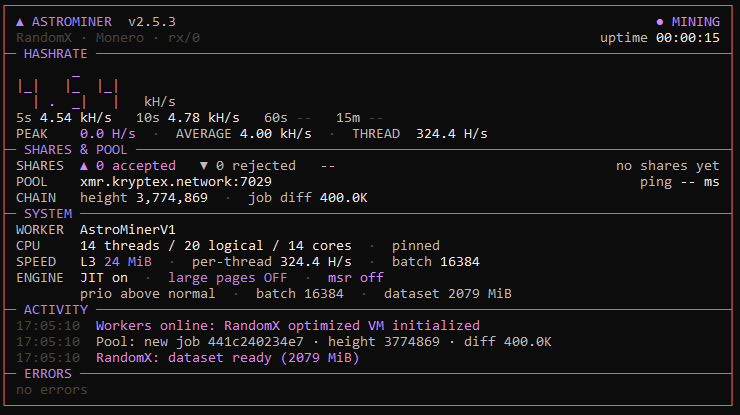
CPU Miner
Available nowCommand-line RandomX (rx/0) miner for Windows with pool and solo modes. Current release: V2.5.3.
- Direct RandomX execution
- Pool (Stratum) + solo (daemon RPC)
- Settings at the top of the BAT files
GPU Miner
Coming soonA command-line GPU miner is in development and will ship as part of AstroMiner, sharing the same configuration style as the CPU miner.
- Device selection
- Per-GPU controls
- Pool support
Windows App
Coming soonA real desktop app that wraps the CPU and GPU command-line miners, so you can set up, control and monitor them without a terminal.
- Start, stop and monitor miners
- CPU + GPU in one window
- Wraps the CPU and GPU CLIs
One ZIP. One place to start.
Extract the AstroMiner CPU release for Windows, open the launcher, and edit only the settings at the top when you need to change a pool, wallet, thread count, or other performance option.
What comes next
CPU Miner
Released. V2.5.3 is available now.
GPU Miner
Next up. GPU mining inside AstroMiner.
Windows App
A desktop app that wraps the CPU and GPU CLIs.
Mining Pools
AstroPool for XMR, PEARL, QTC and more.
Start in under five minutes.
Extract
Extract the release ZIP into a folder you control.
Open the launcher
Choose pool or solo and edit the settings at the top of the BAT.
Run
Leave the defaults alone for a simple start, or tune threads and performance as needed.